 Horizon
Channel Moderators
Delegate channel moderation to trusted members.
As a channel owner, you can promote members to channel moderators. Mods can help you manage your channel and use a configurable set of commands on your behalf.
Use /mod add @user to add a moderator and /mod remove @user to remove one.
Note
Only the channel owner can add or remove moderators. A channel can have a maximum of 7 moderators.
Default Mod Commands
The following commands are available to channel moderators by default:
User Limit
Set the user limit of the channel.
Kick
Disconnect members from the channel.
Block
Block members from joining.
Unblock
Lift a block from a member.
Trust
Grant a member access to a locked or hidden channel.
Untrust
Remove trusted access from a member.
Invite
Invite a member to the channel.
Bitrate
Adjust the audio bitrate of the channel.
Region
Set the voice server region of the channel.
Opt-In Commands
The following commands are disabled for mods by default. They can be enabled by the server admin in the dashboard, or by the channel owner via /mod permissions if the server admin allows it:
Rename
Rename the channel.
Lock / Unlock
Lock or unlock the channel.
Hide / Show
Hide or show the channel.
Status
Set or remove the channel status.
Customizing Permissions Per Channel
Channel owners can use /mod permissions to customize which commands their mods are allowed to use. A selection menu will appear with all available permissions. Select the ones you want to grant.
Note
Depending on the server admin's Enforce Setting, channel owners can either only restrict the delegated permissions or freely choose from all available commands.
Server Admin Configuration
Where to find this?
Open the Dashboard, select your server, pick the correct Creator Channel and navigate to the Access Tab.
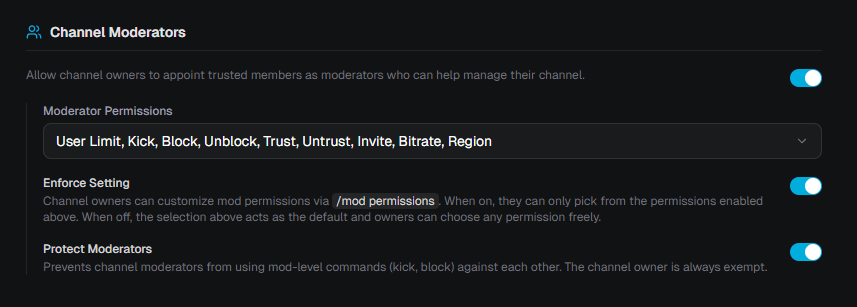
Server admins can configure moderator behavior per generator in the Channel Moderators section of the Access tab.
| Setting | Description |
|---|---|
| Moderator Permissions | Select which commands are available to channel moderators. Changes apply to all channels created by this generator. |
| Enforce Setting | When enabled, channel owners can only pick from the permissions selected above. When disabled, the selection acts as a default and owners can freely adjust via /mod permissions. |
| Protect Moderators | When enabled, channel moderators cannot use mod-level commands (kick, block) against each other. The channel owner is always exempt from this restriction. |